
Track Record: your trading performance
Track Record measures your trading from your real trades. Log them by hand or import your MT4, MT5 or cTrader history, then read your win rate, profit factor, drawdown, R distribution and much more, account by account.
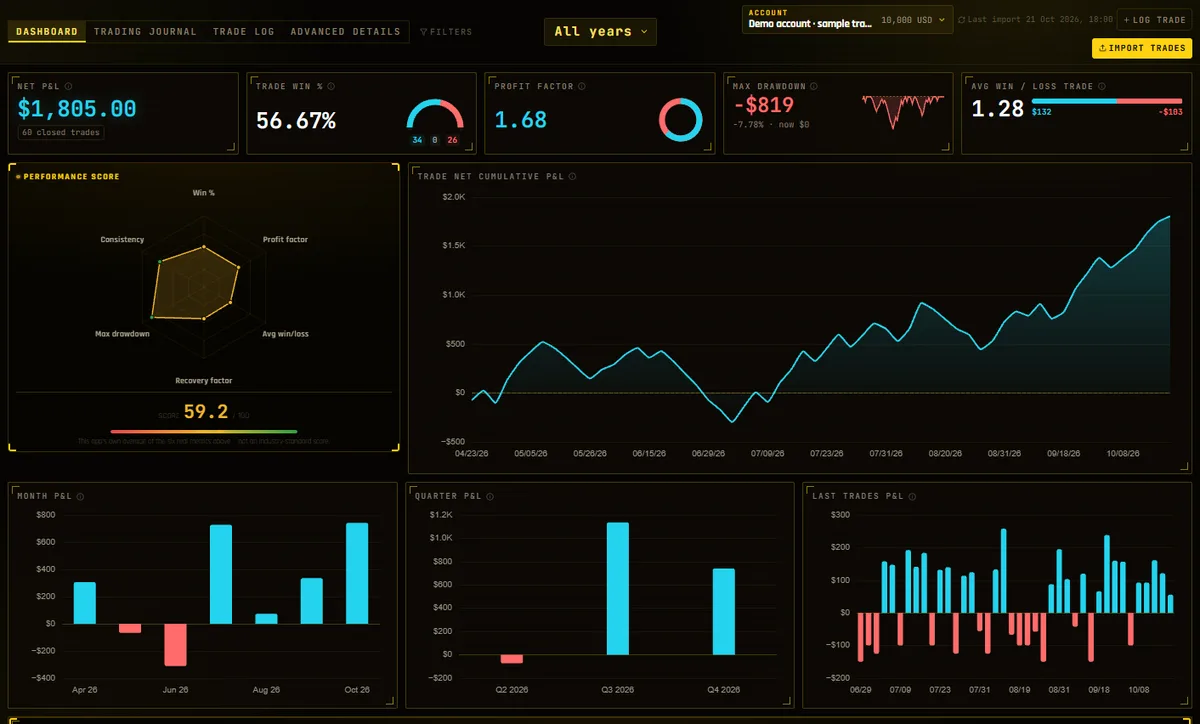
What it shows
Track Record has three tabs, a Filters button and a year selector (All years or a single year).
- Dashboard:
Net P&L,Trade win %(with wins, breakeven and losses),Profit factor,Max drawdownandAvg win / loss trade; a performance score; the trade net cumulative P&L curve; and P&L by month, by quarter and for each of the last 40 closed trades. - Trade Log: your open positions with live unrealised P&L, the list of closed trades, and analytics tables.
- Advanced Details: the drawdown curve, performance by time of day and by holding time, the R distribution with your expectancy, long versus short, P&L and number of trades by weekday, your top and bottom 5 trades and your top 5 symbols. Values can be shown in dollars or as a percentage of the starting balance.
Add your trades
Every statistic is computed from the trades you enter. There are two ways to add them.
Log trade opens a form in four parts: the instrument, direction, size and entry time; the status (Closed or Still open) with the P&L and exit time; optional prices (entry, exit, stop, target) and the risk in dollars, which gives the R multiple; and an optional journal with strategy, setup, tags, thesis and notes. Press Ctrl Enter to save.
Import trades accepts a CSV export from cTrader, or an MT4 or MT5 history report saved with “Save as Report” (.csv, .htm or .html). The terminal detects the columns, shows the mapping so you can check it, and previews exactly what will be created before you confirm.
In MT4 and MT5 reports, the size is in lots. Imported P&L is computed as (exit − entry) × size, so convert lots to units first (1 standard lot is 100,000 units for most FX pairs). cTrader volume is usually already in units. Each import adds all the rows of the file, so do not import the same history twice.
Accounts and starting balance
Use the account selector at the top right to switch between trading accounts or create a new one with a name and a starting balance. The starting balance is used to express drawdown and results as a percentage. You can change it in Advanced Details.
The Trading Journal page, next to Track Record in the Account section of the sidebar, is where you keep your written notes.
How to read it
The info icon on each card explains its calculation. Use Filters to restrict every view to one instrument, to long or short trades, or to one strategy.
- Trade win %: winning closed trades divided by all closed trades; breakeven trades are counted apart.
- Profit factor: gross profit divided by gross loss. Above 1, the winners earned more than the losers lost.
- Max drawdown: the deepest fall of cumulative realised P&L below its previous peak.
- Performance score: a radar of six metrics (win %, profit factor, average win/loss, recovery factor, max drawdown and consistency) and their average from 0 to 100. It is the terminal's own score, not an industry standard.
- R distribution: each closed trade expressed in multiples of the risk taken. Trades need a risk amount or a stop loss to appear.
How to use it in your trading
The aim is to find what works and what holds your results back, from facts rather than impressions.
Example: a trader imports six months of MT5 history. The win rate is 57% and the profit factor 1.68, but Advanced Details shows that most losses come from trades opened late in the New York afternoon, and that short trades lose money overall. The trader might filter on short trades to check the strategies involved, then decide to review those setups before taking them again. A month later, the same filters show whether the change made a difference.
You can also ask Alfred about your results, for example your best symbol this year.
Enter a stop loss or a risk amount on every trade: it unlocks the R multiple and the expectancy, the best measures to compare trades of different sizes.
Questions
Can I import my MT4, MT5 or cTrader history?
Yes. Use Import trades with a cTrader CSV export or an MT4/MT5 report saved with Save as Report (.csv, .htm or .html). You check the column mapping and a preview before importing.
Does Trade Sider connect to my broker to place trades?
No. Trade Sider is an analysis terminal. Your trades are placed with your broker; the Track Record only analyses the trades you log or import.
Can I follow several trading accounts?
Yes. Create one account per trading account in the account selector, each with its own starting balance, and switch between them.
Related pages
Try it in the terminal
Every tool described here is included in the subscription, with a three-day free trial.
Start the free trialTrade Sider is an analysis tool and does not provide investment advice. Trading involves a risk of capital loss.