
Alfred: Trade Sider's AI assistant
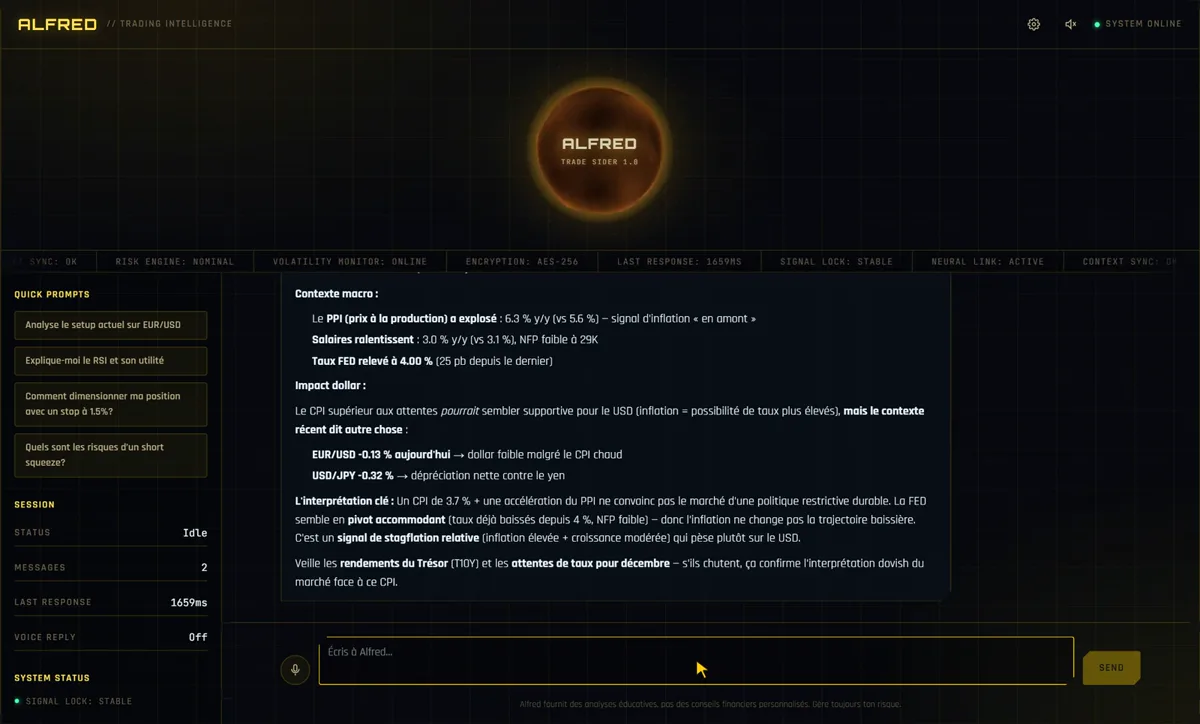
Alfred is Trade Sider's AI assistant. He answers your questions in writing or by voice using the terminal's own data, from the economic calendar to your Track Record, and he can act on the terminal for you.
What Alfred does
Alfred is connected to the data of the terminal. For each question, he chooses which tools to query, and the tools he used appear as small labels at the top of his answer. He answers only from that data; if he does not have a piece of information, he tells you.
- Markets and macro: the economic calendar, policy rates and rate probabilities, quotes, sovereign yields, volatility and macro indicators by country.
- Positioning: retail positioning and the COT report.
- Seasonality and news: a month's seasonal profile or a longer study, the latest headlines and the market wire.
- Your trading: your accounts and your Track Record, and switching between accounts.
- The terminal: he opens the page you mention and can build a custom workspace for a theme you describe.
- Trading journal: he can prepare a trade entry. It is shown as a proposal that you confirm or cancel: nothing is saved without your confirmation.
How to talk to Alfred
Open Alfred from the Global section of the sidebar. Type your question in the message box and press Enter to send (Shift Enter adds a new line), or click a quick prompt on the left. Click the microphone to dictate your message, if your browser supports it.
For a hands-free conversation, click Call Alfred in the top bar from any page. A call window opens; press Esc to hang up. With the Hey Alfred switch turned on, Alfred listens for his name and starts the conversation when you call him. The switch only appears in browsers that support it.
The orb shows what Alfred is doing: idle, thinking, analysing or speaking. The left column shows the session status, the number of messages and the last response time.
How to use it in your trading
Alfred saves time when a question needs several pages of the terminal.
Example: before a US inflation release, a trader might ask: “What is expected for today's CPI, what does the market price for the next Fed meeting, and how are retail traders positioned on EUR/USD?” Alfred queries the calendar, the rate probabilities and the retail positioning, then answers in one message, with the tools used shown above his reply. The trader can then open the Rates page to look at the details.
After a session, the same trader could ask Alfred to summarise the week's results from the Track Record, or say “log a long EUR/USD trade” and check the proposal before confirming it.
Alfred provides educational analysis, not personalised financial advice. Always check the data and manage your own risk.
Settings and options
Alfred also writes the summaries of Session Recap. Use of Alfred is subject to a daily limit that resets every day (UTC).
- Voice: choose Alfred's voice from the voice selector at the top right of the page.
- Voice reply: the speaker icon turns spoken answers on or off in the chat.
- Hey Alfred: the switch in the top bar turns the wake word on or off.
Ask precise questions with an instrument and a time frame, such as “EUR/USD this week”: Alfred then queries exactly the data you need.
Questions
Is Alfred included in the subscription?
Yes. Alfred, including the chat, the voice call and the Hey Alfred wake word, is included in Trade Sider Pro with no extra cost.
Where does Alfred get his information?
From the data of the terminal: calendar, rates, positioning, seasonality, news, quotes and your Track Record. He shows which tools he used and says so when he does not have the data.
Can Alfred place trades for me?
No. Trade Sider does not place orders. Alfred can prepare a trading journal entry, which is only saved after you confirm it.
Related pages
Try it in the terminal
Every tool described here is included in the subscription, with a three-day free trial.
Start the free trialTrade Sider is an analysis tool and does not provide investment advice. Trading involves a risk of capital loss.