
Guide · Trading terminal
Trading terminal: what it is, what it should include and how to choose one
A trading terminal is the screen a trader works from: prices, news, economic data and analysis gathered in one place, so decisions are made with the full picture rather than ten browser tabs. This guide explains what a trading terminal is, the different types that exist, what a good one must include, how the best-known terminals compare and how to pick the right one for the way you trade.
What is a trading terminal?
A trading terminal is software that brings together everything a trader needs to follow the markets and make decisions: live quotes, charts, news, the economic calendar, macroeconomic data and, depending on the product, order execution. The word comes from the professional world, where the Bloomberg Terminal and Refinitiv Eikon have been the standard screens of banks and funds for decades.
In everyday use, the term covers very different products. For some traders, the trading terminal is simply the order window of their broker. For others, it is a full research station where macro, positioning and news are cross-checked before taking a position. That is why the first question is not "which terminal is best", but "what do I need my terminal to do".
A short history of the trading terminal
Trading terminals were born in the 1970s, when Reuters launched its Monitor service in 1973 and brought currency prices to bank screens instead of the telephone. In 1982 the first Bloomberg terminal was delivered to Merrill Lynch: a dedicated machine that combined prices, analytics and, later, news and messaging. For forty years, this model — one very expensive screen per professional — defined what a trading terminal was.
Two waves then opened the market to individual traders. In 2005, MetaTrader 4 gave forex brokers a free execution platform with charts, and it became the standard of retail trading; MetaTrader 5 followed in 2010. From 2011, TradingView put professional-grade charts in the browser. The latest wave is web terminals that bring institutional data — central banks, positioning, macro news — to the browser at a retail price, often with an AI assistant to make sense of it.
The five types of trading terminals
Most products sold as trading terminals fall into one of five families:
- Broker execution terminals: MetaTrader 4 and 5, cTrader or the web platform of your broker. Free with an account, built to place and manage orders, with charts and indicators. Little or no macro data.
- Charting platforms: TradingView is the best-known. Excellent charts, scripts and a large community, with a free plan and paid tiers. Fundamental and positioning data stay limited.
- Crypto order terminals: Tools that connect to several exchanges through API keys to trade from one interface, often with bots and smart orders. Built for crypto execution, not for macro analysis.
- Institutional data terminals: Bloomberg, Refinitiv/LSEG Workspace, FactSet. Every asset class, every data set, professional messaging, at a price designed for banks: around 25,000 to 32,000 dollars per user per year according to public estimates.
- Macro and market analysis terminals: Web terminals that bring institutional-style data to individual and professional traders: central banks, rates, economic calendar, positioning, sentiment, news. Trade Sider belongs to this family.
What a good trading terminal should include
Whatever the type, a terminal is only useful if it saves you time and shows you what moves prices. For a forex, index, commodity or macro trader, here is the checklist that matters:
- Live, multi-asset quotes: FX, indices, commodities, rates and crypto on one screen, to see how markets react together.
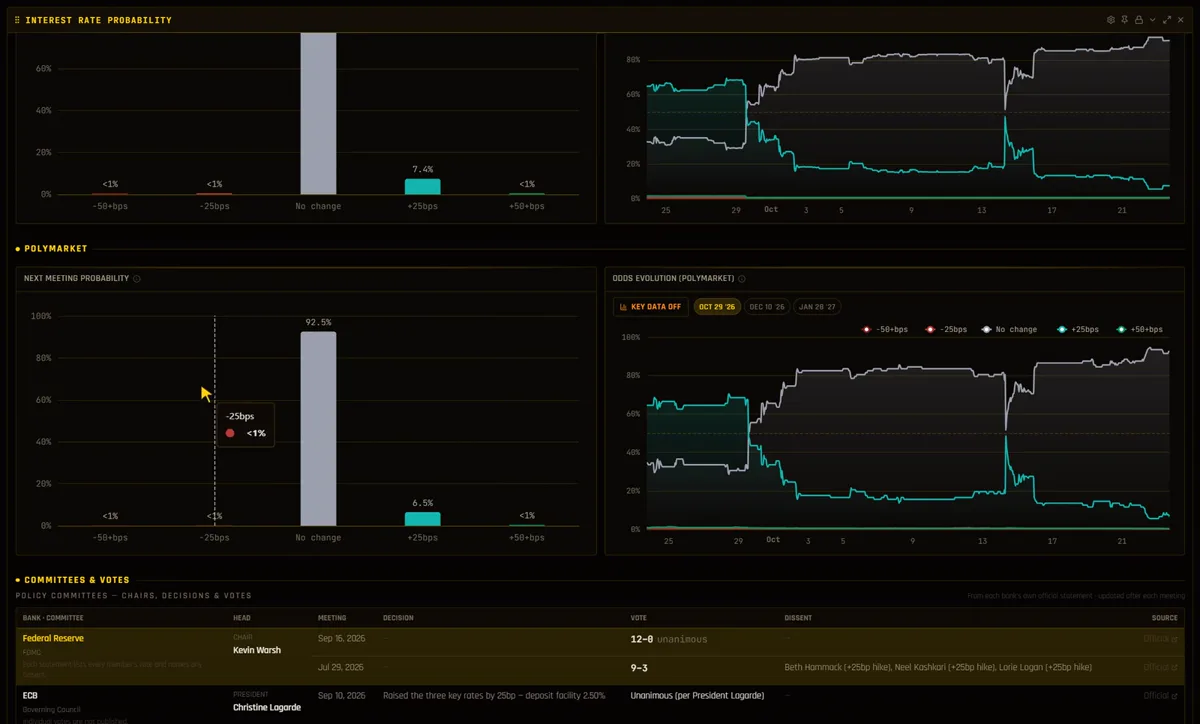
- Central banks: Policy rates, dates of the next meetings and the probabilities priced in by the market for the Fed, the ECB, the BoE, the BoJ and the others.
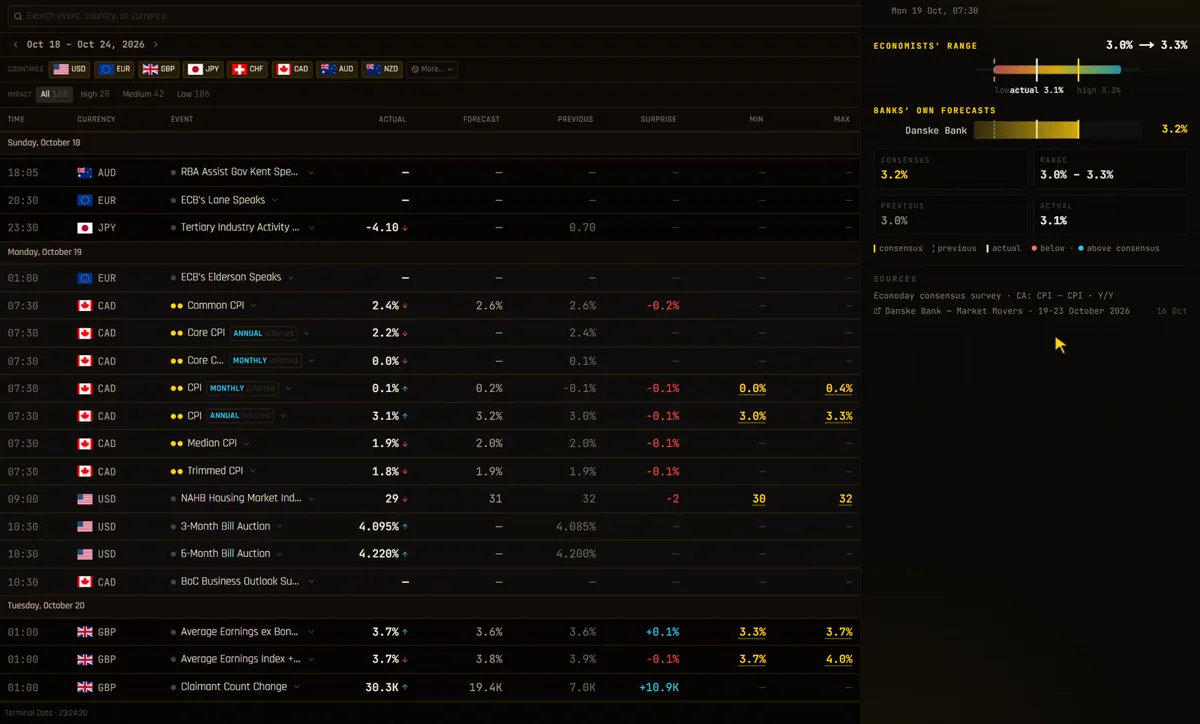
- Economic calendar: Releases with consensus, previous value and actual figure, plus their expected impact.
- News in real time: A squawk or headline feed fast enough to react before the move is over.
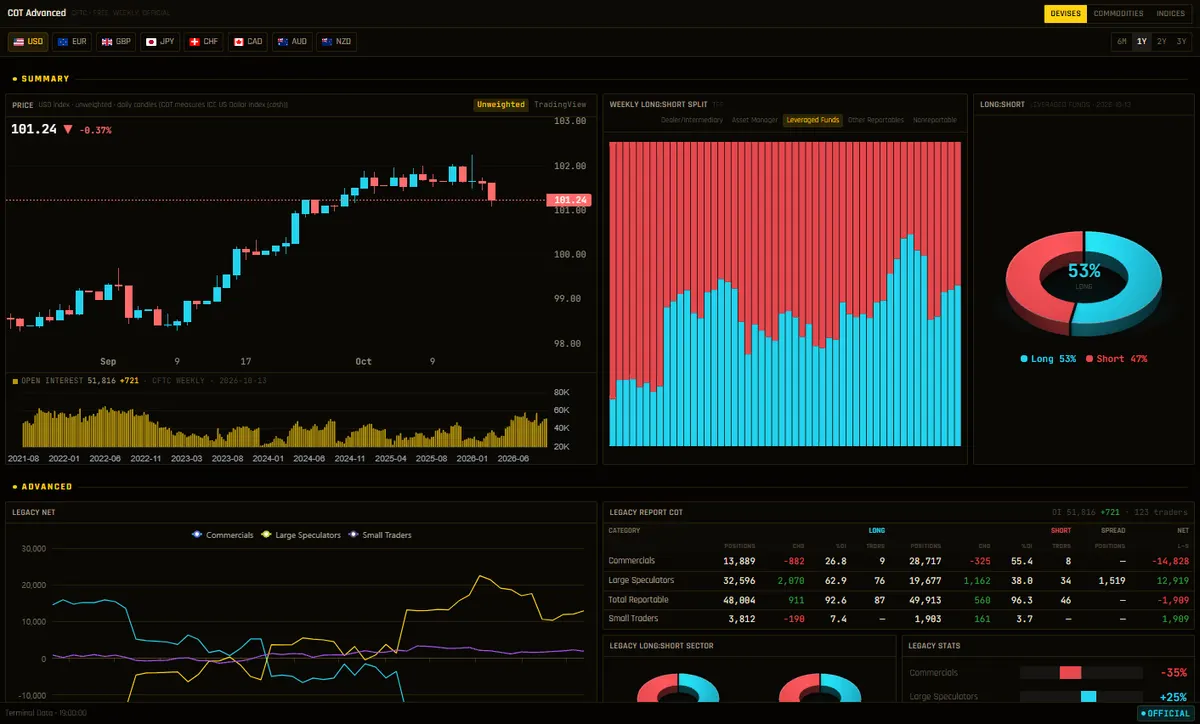
- Positioning and sentiment: COT reports (what funds and commercials hold), bank desk positioning and retail sentiment, to know which side of the market is crowded.
- Seasonality and history: How an asset has behaved at the same time of year in the past.
- Your own results: A track record of your trades to measure what works for you.
- No installation: A web terminal works on any computer, with nothing to install or maintain.
Data freshness: real time, delayed and scheduled
Not every figure in a terminal updates at the same speed, and knowing which is which avoids costly mistakes:
- Real time: quotes and headlines. A few seconds of delay make a difference when a central bank decision or an inflation figure hits the market.
- Delayed: some exchanges charge for live data, so free platforms often show index or futures prices 10 to 20 minutes late. Always check what you are looking at.
- Scheduled: economic releases come out at fixed times, and the COT report is published every Friday with positions as of the previous Tuesday. The value of a terminal is to show them the moment they are released, alongside the consensus.
- Computed: rate probabilities, sentiment or seasonality are derived from other data. A good terminal tells you what they are based on so you can judge them.
Web terminal or software to install?
Historically, a terminal was software installed on one computer, sometimes with its own keyboard. Today most new terminals run in the browser. The trade-offs are simple:
- Web terminal: nothing to install or update, works on Windows, Mac and Linux, from the office or at home, and your settings follow you. It needs a stable internet connection — which any trading activity requires anyway.
- Installed software: useful for heavy automated strategies or very specific execution needs, at the cost of installation, updates and a single machine.
Bloomberg vs TradingView vs MetaTrader vs Trade Sider
These four names come up most often when traders look for a trading terminal. They do not do the same job, which is why the comparison below focuses on purpose, price and the data that drives macro decisions.
Main differences between the most common trading terminals.
| Trade Sider | Bloomberg Terminal | TradingView | MetaTrader 4/5 | |
|---|---|---|---|---|
| Main purpose | Macro and market analysis | Institutional data on every asset | Charting and community | Order execution via a broker |
| Typical price | 59 € / month | ≈ $25,000–32,000 / year* | Free plan, paid tiers | Free with a broker |
| Central banks and rates | Yes, with meeting probabilities | Yes, very complete | Partial | No |
| Economic calendar and news | Yes, with squawk | Yes | Yes | Calendar on MT5 |
| Positioning (COT, sentiment) | Yes: COT, bank desks, retail | Yes | Through community scripts | No |
| Order execution | No, keep your broker | Yes, for institutions | Yes, with partner brokers | Yes |
| Installation | None (web) | Software and keyboard | Web and app | Software or web |
*Public estimates of the annual price per user. Prices and features of third-party products can change; check them on the publishers' websites.
How to choose your trading terminal
Start from your trading style rather than from the feature list:
- You mostly place orders and scalp: your broker's platform (MetaTrader, cTrader) is enough for execution; add an analysis terminal if you trade around news.
- You trade charts and patterns: a charting platform such as TradingView covers most of your needs.
- You trade macro, forex or indices around central banks and data: you need a terminal with central banks, rates, the calendar, news and positioning in one place, which is exactly what a macro terminal is built for.
- You manage money professionally with a large budget: an institutional terminal remains the reference, at a corresponding price.
Example: a US inflation (CPI) day with a trading terminal
Here is how a macro trader uses a terminal around one of the most market-moving releases of the month, the US consumer price index:
- The day before: check the consensus and the range of forecasts in the economic calendar, the probabilities of the next Fed meeting, and how funds are positioned on the dollar in the COT report. A crowded long dollar makes a downside surprise more violent.
- One hour before: look at how the dollar, yields and indices are trading, and list what each scenario (above, in line, below consensus) would change for the Fed.
- At the release: the figure appears in the calendar next to the consensus, the squawk reads it out, and you watch the reaction of the dollar, rates and indices on the same screen.
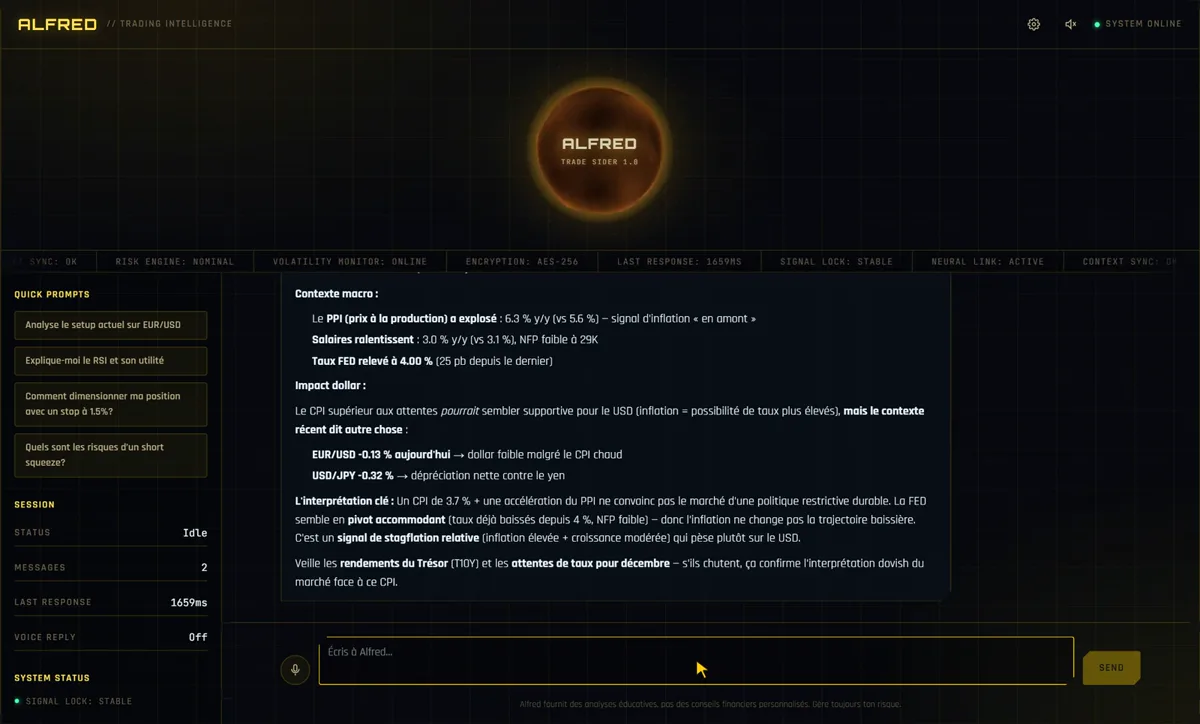
- Just after: check how the meeting probabilities have moved: they tell you how the market reads the figure. An assistant such as Alfred can sum up the surprise and its likely impact in a few seconds.
- The next days: follow whether the move holds and how positioning evolves in the following COT report.
Five mistakes to avoid when choosing a trading terminal
- Paying for data you will never read: a terminal with every asset on earth is no use if you trade four currency pairs and two indices.
- Not checking whether prices are delayed: a free chart 15 minutes late is fine for analysis, not for trading the news.
- Ignoring macro: most big moves in forex and indices start with a central bank or an economic release. A terminal without a calendar and central banks leaves you blind to them.
- Confusing analysis and execution: your broker executes, your terminal informs. Keeping the two separate lets you choose the best of each.
- Multiplying tabs and tools: the point of a terminal is to bring the information together. If you still need ten websites around it, it is not doing its job.
Trading terminal glossary
The words you will meet in any trading terminal:
- COT (Commitments of Traders): weekly report from the US futures regulator showing how speculators, commercials and other groups are positioned on each futures market.
- Squawk: a live audio or text feed of market-moving headlines, read out as they happen.
- Consensus: the average forecast of economists for an economic release. Markets move on the gap between the actual figure and the consensus.
- Policy rate: the key interest rate set by a central bank, such as the Fed funds rate or the ECB deposit rate.
- Meeting probabilities: the chances, priced by the markets, that a central bank raises, holds or cuts at its next meeting.
- Retail sentiment: the share of individual traders who are long or short on a market, often used as a contrarian signal.
- Positioning: how large players (funds, banks, commercials) are exposed on a market, to spot crowded trades.
- Seasonality: the average behaviour of an asset at the same period of the year over many years.
- Economic calendar: the schedule of upcoming economic releases and central bank events, with their expected impact.
- Track record: the history of your own trades, used to measure your performance and what works for you.
Trade Sider: the trading terminal for macro and market traders
Trade Sider is a web trading terminal that brings together 24 professional tools in six sections: markets, central banks and rates, news and the squawk, the economic calendar, positioning (COT, bank desks, retail sentiment) and seasonality, plus the analysis of your own trading results.
Its difference is Alfred, a voice and text AI assistant that cross-checks this data for you: ask it what the market expects from the next Fed meeting, how funds are positioned on the euro or what the calendar holds for the week, and it answers from the terminal's live data. You keep the decision.
Trade Sider is an analysis terminal: you keep your usual broker to place orders. It runs in the browser, with nothing to install, for 59 € per month or 588 € per year, with a three-day free trial.
Trading terminal: frequently asked questions
What is a trading terminal?
A trading terminal is software that gathers what a trader needs to follow the markets and decide: live prices, charts, news, the economic calendar, macro data and, depending on the product, order execution.
Is a trading terminal the same as a trading platform?
Not exactly. A trading platform is usually the broker's software used to place orders. A trading terminal is broader and focuses on information and analysis; some terminals also execute orders, others such as Trade Sider are dedicated to analysis and work alongside your broker.
How much does a trading terminal cost?
From free (broker platforms such as MetaTrader) to about 25,000–32,000 dollars per user per year for an institutional terminal such as Bloomberg, according to public estimates. Trade Sider costs 59 € per month or 588 € per year.
Do I need a Bloomberg terminal to trade macro?
No. The Bloomberg Terminal is built for institutions and priced accordingly. A macro terminal such as Trade Sider gives individual and professional traders the data that matters most for forex and indices — central banks, rates, calendar, news and positioning — for a fraction of the price.
Can I place orders from Trade Sider?
No. Trade Sider is an analysis terminal: you analyse in Trade Sider and keep your usual broker to execute your trades.
Is there a free trial?
Yes. New subscribers get a three-day free trial of the full terminal; you can cancel before it ends and you will not be charged.