
Session Recap: Tokyo, London and New York sessions
Session Recap gives you a file for every trading session and every week: how the main markets moved, which economic releases and headlines came out, and a short written summary by Alfred, the terminal's AI assistant.
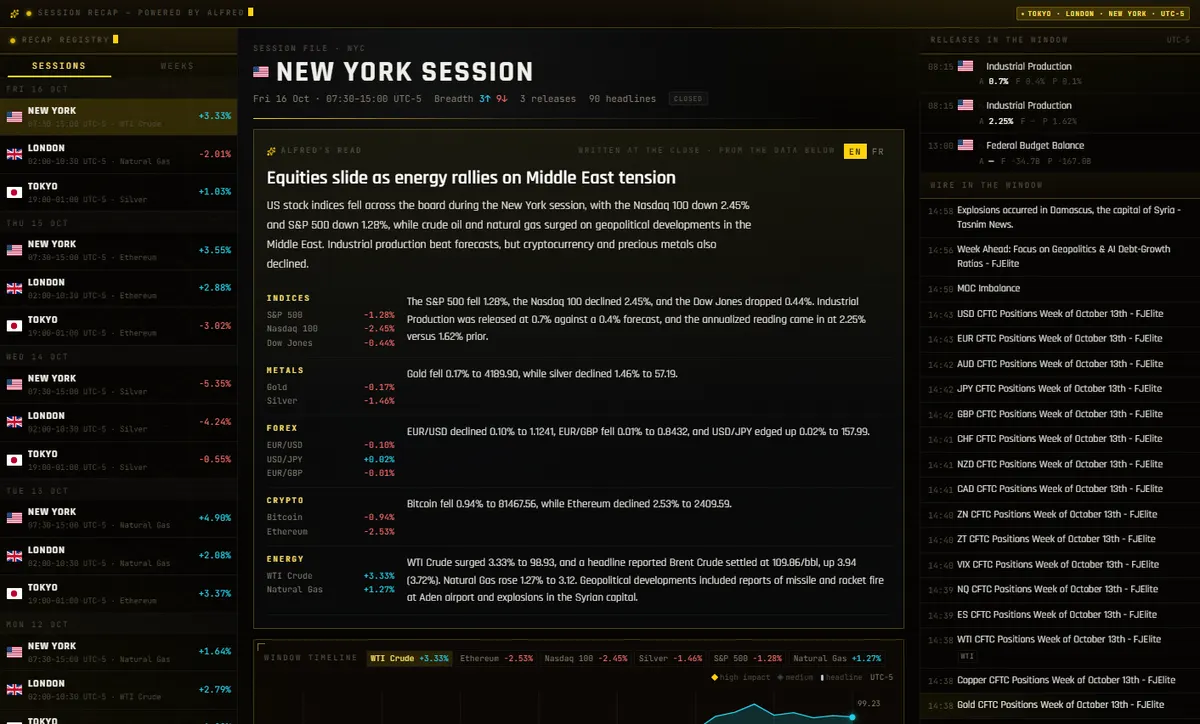
What it shows
The left column, Recap registry, has two tabs. Sessions lists the Tokyo, London and New York sessions of the last eight weekdays, each with the biggest move of the session. Weeks lists the last six trading weeks.
Session windows follow the local hours of each centre: Tokyo from 09:00 to 15:00 Tokyo time, London from 08:00 to 16:30 London time and New York from 08:30 to 16:00 New York time. Times on the page are shown in your own time zone.
The centre of the page is the session file:
- Header: the date and window, the
Breadth(how many tracked markets rose and fell), the number of releases and headlines, and whether the session isLIVEorCLOSED. - Alfred's read: a headline, a short summary, then one paragraph per market group: Indices, Metals, Forex, Crypto and Energy. Next to each paragraph, the moves of the S&P 500, Nasdaq 100, Dow Jones, gold, silver, EUR/USD, USD/JPY, EUR/GBP, Bitcoin, Ethereum, WTI crude and natural gas.
- Window timeline: the price path of a selected market during the window, with markers for economic releases and headlines.
How to read it
Alfred writes the read at the close of the session, only from the data of that window: the open-to-close move of each market, the releases and the headlines. While a session is in progress, the page says so and the moves update live.
The right column lists the Releases in the window (medium and high impact, with actual, forecast and previous) and the Wire in the window, the headlines published during the session. Together with the timeline, they help you link a move to the event that came with it.
How to use it in your trading
Session Recap is the fastest way to catch up after a session you did not follow.
Example: a trader in Europe starts the day after the Tokyo session. They open the latest Tokyo file, see that USD/JPY was the largest mover, click it to trace it on the timeline and notice a sharp move just after a Japanese data release listed on the right. Before London opens, the trader might check that release in the economic calendar and look at the Rates page for Bank of Japan expectations.
The Weeks tab is useful at the weekend to review the whole week before preparing the next one.
Settings and options
- Sessions / Weeks: switch between session files and weekly files.
- EN / FR: read Alfred's summary in English or in French.
- Trace on the timeline: click a market in the moves to draw its path on the window timeline.
Read the session that just closed before the next one opens: London before New York, New York before Tokyo.
Questions
When is the session summary written?
Alfred writes the read at the close of each session, using only the moves, releases and headlines of that window. During the session the moves update live.
What are the session hours used?
Tokyo 09:00 to 15:00 Tokyo time, London 08:00 to 16:30 London time and New York 08:30 to 16:00 New York time, displayed in your own time zone.
How far back can I go?
The Sessions tab covers the last eight weekdays and the Weeks tab the last six weeks.
Related pages
Try it in the terminal
Every tool described here is included in the subscription, with a three-day free trial.
Start the free trialTrade Sider is an analysis tool and does not provide investment advice. Trading involves a risk of capital loss.