
Squawk
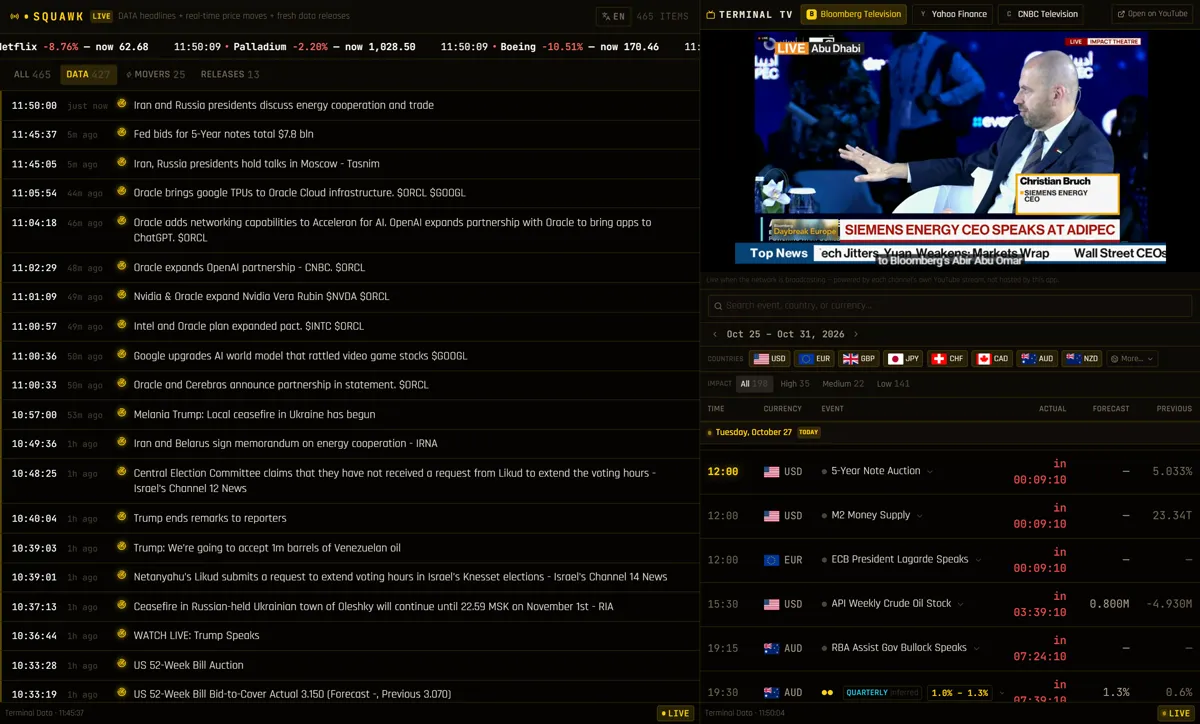
The Squawk is the terminal's real-time wire: breaking market headlines, fresh data releases and the biggest price moves in one list, timestamped to the second. The page also shows live business TV and the economic calendar.
What it shows
A squawk is a fast audio or text feed of market-moving news used on trading desks. Trade Sider's Squawk is the text version: short headlines, delivered as they happen, each with its exact time (hours, minutes and seconds) and how long ago it arrived. New items flash briefly when they appear, and a scrolling strip at the top repeats the latest items.
The wire combines three kinds of items, each with its own tab:
- DATA: breaking market headlines: economic data, central bank comments, geopolitics, company news. This is the tab shown by default. It covers the last 48 hours.
- Movers: the instruments with the largest percentage moves at the moment, with the change and the current price, marked
MOVER ▲orMOVER ▼. - Releases: economic figures published in the last 24 hours (medium and high impact), with the actual, the forecast and the surprise. High-impact releases are tagged
RELEASE. - All: everything together, newest first.
How to read it
Headlines are colored by impact. Red headlines are those the terminal identifies as potentially market-moving: top-tier data prints from a major economy (CPI, GDP, jobs, wages, retail sales, PMI or ISM, rate decisions, jobless claims), an actual central bank rate move or emergency action, attacks on energy infrastructure or shipping routes, defaults and downgrades, trading halts, OPEC+ output changes, new sanctions or tariffs. Everything else is yellow. The classification is based on keywords in the headline text, so treat it as a guide, not a guarantee.
In the Releases tab, the surprise is shown in blue when the figure came out above the forecast and in red when it came out below. Remember that above forecast is not always good news for a currency: a higher unemployment rate, for example, is a negative surprise for the economy.
A headline is a starting point. Before reacting, ask whether it changes expectations for growth, inflation or interest rates, and check whether price is actually moving in the Movers tab.
How to use it in your trading
Example: an FOMC decision is due at 14:00 New York time. Keep the Squawk open on the DATA tab. The decision appears as a headline within seconds, followed by lines from the statement and, later, from the press conference. Switch to Movers to see which markets react most, then check the Rates page to see how probabilities for the next meetings have changed.
On a data-heavy morning, the Releases tab gives a clean list of every figure already out with its surprise, so you can see at a glance whether the day's data has been stronger or weaker than expected.
Terminal TV and calendar
On the right of the page, Terminal TV streams live business news channels when they are broadcasting; use the buttons above the player to switch channel. Below it, the full Economic Calendar shows the week's events with a countdown to each release, so you can see what is coming next without leaving the wire.
Filters and settings
The tabs at the top of the wire filter by item type and show the number of items in each. The EN / FR button translates headlines into French and back to their original language.
The Squawk wire also appears on the Overview page, so you can follow it while watching the rest of the market.
Questions
What is a squawk in trading?
A squawk is a real-time feed of short market-moving headlines, originally read aloud on trading desks. It lets traders learn about news and data within seconds of publication.
Why are some headlines red?
Red marks headlines the terminal identifies as potentially high impact, such as top-tier data from a major economy, a central bank rate move or a major geopolitical event. The rest are yellow.
How far back does the Squawk go?
Headlines cover the last 48 hours and the Releases tab covers the last 24 hours.
Related pages
Try it in the terminal
Every tool described here is included in the subscription, with a three-day free trial.
Start the free trialTrade Sider is an analysis tool and does not provide investment advice. Trading involves a risk of capital loss.